


courses.udemyCourses
courses.exploreCourses
- Home
- courses.udemyCourses

Want to build an AI-powered chatbot that can analyze and answer questions based on PDF content? In this hands-on course, you'll learn how to create a full-stack PDF Q&A chatbot using React, Azure Blob Storage, and OpenAI API (GPT-4o-mini).
What You'll Learn:
• Set up and launch a ReactJS project (Next.js) with Q&A Interface and configure essential packages
• Upload PDFs and store them in Azure Blob Storage
• Extract content from PDFs using Azure Intelligent Document Service
• Integrate OpenAI API to process and answer user questions
• Handle state management in React to optimize chatbot interactions
Who Is This Course For?
Perfect for developers looking to integrate AI-powered document processing, beginners eager to explore ReactJS, Azure, and OpenAI APIs, and tech enthusiasts interested in building smart chatbot applications.
Why Take This Course?
Step-by-step guidance with real-world implementation. No prior AI experience required—everything is explained in detail. By the end of this course, you'll have a fully functional AI chatbot that can analyze PDF documents and provide intelligent answers.

Master the most powerful AI models through hands-on projects using Google Colab. This comprehensive course covers everything from setting up Colab to implementing advanced AI models for translation, Q&A, image generation, voice synthesis, and video creation.
What You'll Learn:
• Set up and use Google Colab: create projects, run Python code, choose GPUs, and work with external files and Google Drive
• Translation with NLLB Model: translate text across 200+ languages
• Q&A Systems: Build chatbots using Llama 3, Mistral-7B, and GPT-2 models based on FAQ files and JSON data
• Image Generation: Create images from text using Stable Diffusion model
• Image Recognition: Analyze and describe images using GPT-4o model
• Voice Generation: Generate voice files from text using Bark model
• Text to Video: Create videos from text descriptions using text-to-video-ms-1.7b model
Bonus Content:
• Deepseek: Describe images with text using the Janus-1.3B model
• AI Multi-Agent: Build an AI multi-agent system for Q&A on multiple PDFs using ReAct, LlamaIndex, and OpenAI
Who Is This Course For?
Perfect for developers, data scientists, and AI enthusiasts who want hands-on experience with cutting-edge AI models. No expensive hardware required—everything runs on Google Colab's free GPU resources.
Why Take This Course?
Get practical, hands-on experience with the latest AI models including GPT-4o, Llama 3, Mistral-7B, Stable Diffusion, and more. Learn to integrate Hugging Face and OpenAI APIs, work with various data formats, and build real-world AI applications—all without needing powerful local hardware.
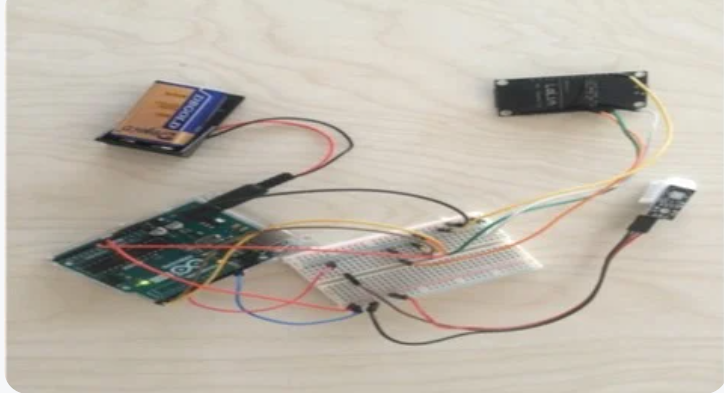
Learn IoT development through a practical temperature sensor project. Reading and visualizing temperature data is an excellent way to understand the world of IoT. This hands-on course teaches you to build a complete IoT system that collects temperature data and transmits it wirelessly to a remote server.
What You'll Learn:
Hardware Setup:
• Connect IoT hardware components (DHT22 temperature sensor, Arduino UNO, NodeMCU LoLin) to work together
• Power up IoT hardware using battery supply for portability
• Use breadboard to connect Arduino UNO and NodeMCU LoLin
Software Development:
• Get temperature data from DHT22 sensor
• Forward temperature data from sensor to Arduino UNO
• Transmit data from Arduino UNO to NodeMCU LoLin
• Send temperature data from NodeMCU LoLin to remote Raspberry Pi via MQTT messages
Development & Production:
• Set up development environment using Arduino IDE and Visual Studio Code
• Program and upload code from laptop to Arduino UNO and NodeMCU LoLin
• Configure battery-powered IoT hardware for mobile data collection
Key Features:
The NodeMCU LoLin supports multiple Wi-Fi modes, allowing you to publish temperature data to any remote server. Since the hardware is battery-powered, you can collect temperature data from anywhere—all you need is a Wi-Fi hotspot or smartphone. The course uses Arduino UNO as an intermediary component, providing more free pins for future expansion and preparing a solid IoT infrastructure.
Who Is This Course For?
Perfect for electronics enthusiasts, makers, and developers interested in IoT. Ideal for beginners who want to understand how IoT devices work together, from sensors to cloud connectivity.
Why Take This Course?
Build a complete, working IoT system from scratch. Learn to integrate hardware components, program microcontrollers, and transmit data wirelessly. By the end, you'll have a portable temperature monitoring system that can send data anywhere in the world.